PM Youth Chromebook Scheme 2026
The PM Youth Chromebook Scheme 2026 aims to support students in Pakistan by providing Chromebooks for educational use. According to the federal government’s launch announcement, the programme targets the distribution of 500,000 Chromebooks over two years, with MiFi internet connectivity also announced.
However, not every student is automatically eligible. The official registration portal managed by the Inter Boards Coordination Commission (IBCC) lists specific school and grade requirements that vary by region. Students should check their eligibility, prepare the required documents and confirm the latest registration instructions before applying.
The official portal is pmychromebooks.ibcc.edu.pk. This guide explains the published eligibility criteria, online application process, document requirements and important details that students and parents should know.
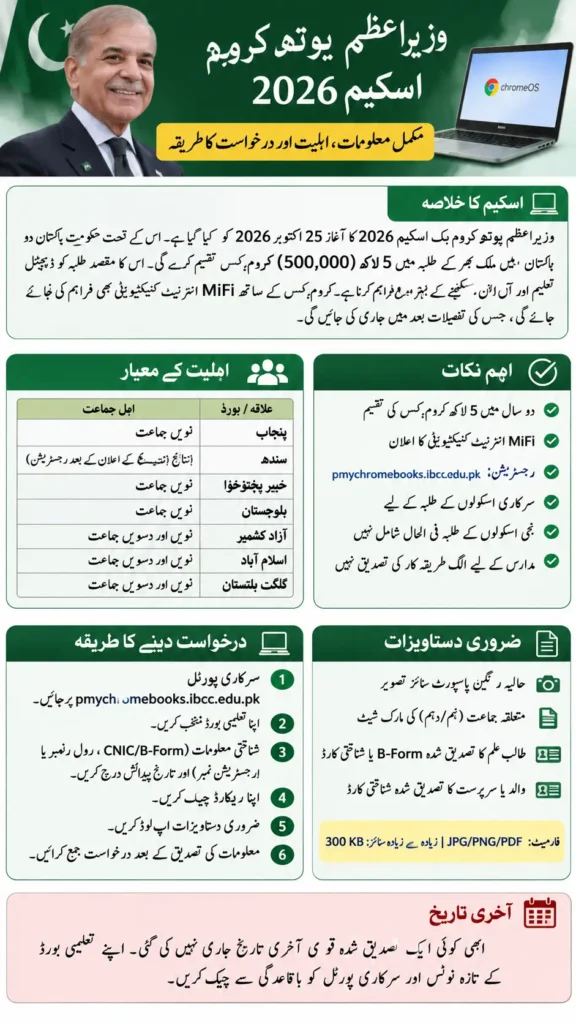
PM Youth Chromebook Scheme 2026 Overview
The federal government formally launched the scheme on 25 October 2026. Its announced target is to distribute 500,000 Chromebooks nationwide over two years.
| Scheme detail | Information |
|---|---|
| Scheme name | PM Youth Chromebook Scheme 2026 |
| Announced distribution target | 500,000 Chromebooks |
| Distribution period | Two years, according to the government announcement |
| Official registration portal | IBCC Chromebook Scheme |
| Eligible students | Top-performing students meeting the published school and grade criteria |
| School requirement | Government/public school under the current portal criteria |
| Internet connectivity | MiFi connectivity announced |
| Registration deadline | Check the latest instructions for your board |
| Device specifications | Not confirmed in the official sources reviewed |
The 500,000 figure is a national distribution target. It does not mean every applicant will receive a device or that all devices are available in a single registration phase.
The government has also announced MiFi connectivity alongside the Chromebook Scheme. However, the exact data package, service provider, connectivity duration and any ongoing costs have not been confirmed in the official information reviewed.
Who Is Eligible for the PM Youth Chromebook Scheme?
The official IBCC portal describes eligible applicants as top-performing students from government/public schools, based on the 2026 annual examinations. The grade requirements differ according to the student’s board or region.
Eligibility criteria by region
| Board or region | Grades listed by the portal | School type |
|---|---|---|
| Punjab | Grade 9 | Government/public |
| Sindh | Grade 9, subject to the portal’s result-related registration condition | Government/public |
| Khyber Pakhtunkhwa | Grade 9 | Government/public |
| Balochistan | Grade 9 | Government/public |
| Azad Jammu and Kashmir | Grades 9 and 10 | Government/public |
| Islamabad Capital Territory | Grades 9 and 10 | Government/public |
| Gilgit-Baltistan | Grades 9 and 10 | Government/public |
These criteria reflect the official portal’s published information reviewed on 27 October 2026. Students should check the live portal for any subsequent changes.
Can private-school students apply for Chromebook Scheme?
Under the currently published IBCC portal criteria, eligibility is limited to students enrolled in government/public schools. The portal does not confirm that students from ordinary private schools can apply through this registration process.
Students should not rely on general news headlines that describe the scheme as being for all students in Pakistan. The eligibility conditions on the official registration portal are more specific.
Can madrassah students apply for Chromebook Scheme?
Official launch coverage mentions students from religious seminaries. However, the current IBCC portal’s eligibility section specifies government/public-school students and does not clearly explain a separate registration route for madrassah students.
Students enrolled in religious seminaries should look for an official notice or separate instructions applicable to their institution rather than assuming that the same online form applies to them.
Is there a minimum percentage required?
The official portal describes eligible students as top-performing students but does not establish a universal minimum percentage in the information reviewed.
Claims that every applicant must have a particular percentage, such as 50%, should not be treated as confirmed unless an official notice specifies that threshold. Students should check the selection criteria and their board’s instructions.
PM Youth Chromebook Scheme 2026 Last Date
A single nationwide registration deadline could not be confirmed from the official portal information reviewed.
Some examination boards have issued their own notices. For example, BISE Multan published a notice referring to 19 October 2026, a date that has already passed. That board-specific deadline should not automatically be applied to students from other regions.
The IBCC portal also states that Sindh registration will open after all Sindh boards announce their 2026 Class 9 annual examination results.
Before applying, students should:
- Open the official IBCC registration portal.
- Check the latest instructions for their board.
- Visit their examination board’s official website for any new notice.
- Confirm whether registration is currently open.
- Follow the deadline and instructions that apply to their own board.
Do not rely on a date copied from an older news report or third-party website unless it matches current official instructions.
How to Apply Online for the PM Youth Chromebook Scheme
Students can use the official IBCC Chromebook Scheme portal to check their records and follow the registration process.
Step 1: Open the official portal
Visit https://pmychromebooks.ibcc.edu.pk/.
Make sure the website address is correct. Avoid unofficial registration links or individuals who claim they can guarantee a Chromebook Scheme in exchange for payment.
Step 2: Select your examination board
Choose the board associated with your examination record. Check that you have selected the correct board before entering your details.
Step 3: Enter your identification details
The portal asks students to provide identifying information and their date of birth. Accepted identifiers include:
- CNIC or B-Form number
- Examination roll number
- Registration number
Enter the details as requested. The portal instructs users to enter identifying numbers without dashes where specified.
Step 4: Check your student record
The portal checks the information against records supplied by the relevant examination board.
If your record does not appear, try another accepted identifier, such as your roll number or registration number. If the problem continues, contact your examination board for assistance.
A missing record does not necessarily mean that you are ineligible. It may mean that your details need to be checked against the board’s records.
Step 5: Prepare and upload your documents
Gather the required photograph, mark sheet and attested identity documents. Check the file formats and size limits before uploading them.
The detailed document checklist appears in the next section.
Step 6: Review your application carefully
Check your name, date of birth, examination details and uploaded documents before submitting.
The portal states that each student can apply once and cannot edit the form themselves after submission. Correcting mistakes beforehand is therefore essential.
Step 7: Save your confirmation
After submission, save any reference number or downloadable slip provided by the portal. Keep it for your records and follow any further instructions displayed by the official system.
Documents Required for Chromebook Scheme Registration
The official IBCC portal lists the following document categories and upload specifications.
| Required document | Accepted format | Maximum file size |
|---|---|---|
| Recent colour photograph with a plain background | JPG or PNG | 300 KB |
| Relevant Grade 9 or Grade 10 mark sheet | JPG, PNG or PDF | 300 KB |
| Attested copy of the student’s B-Form or CNIC | JPG, PNG or PDF | 300 KB |
| Attested copy of the father’s or guardian’s CNIC | JPG, PNG or PDF | 300 KB |
Follow the live portal’s instructions if the requirements change.
How to prepare your documents for Chromebook Scheme
- Use a clear photograph with a plain background.
- Make sure the mark sheet is readable.
- Prepare the attested identity documents requested by the portal.
- Check each file’s format and size before uploading.
- Ensure your personal information matches your examination board’s records.
Do not assume that uploading a document automatically satisfies every requirement. Follow the exact instructions shown during registration.
What Will Students Receive Under the Scheme?
The government has announced a target of 500,000 Chromebooks over two years, along with MiFi internet connectivity.
These are the main details currently supported by official announcements:
- Chromebooks: The government has announced a nationwide distribution target.
- MiFi connectivity: Internet connectivity through MiFi devices has been announced as part of the initiative.
- Distribution period: The official launch announcement describes a two-year period.
Some important details remain unconfirmed.
Are the Chromebooks new or refurbished?
The official sources reviewed do not establish whether all devices will be new or refurbished. Some media reports use the term “refurbished,” but the official information reviewed does not confirm that specification.
For now, it is more accurate to refer to them simply as Chromebooks.
Will students receive free internet?
The government has announced MiFi internet connectivity alongside the devices. However, the exact data allowance, network provider, duration and ongoing costs have not been confirmed in the official information reviewed.
Students should wait for official instructions before assuming that a particular internet package or duration is included.
Will every applicant receive a Chromebook Scheme?
The announced target does not guarantee a device for every person who submits an application. Students must meet the published eligibility criteria and follow the official selection and allocation process.
The sources reviewed do not establish a guaranteed device allocation for every eligible applicant.
Important Rules Before Submitting Your Application
Students should keep the following points in mind:
- Apply through the official portal: Use the IBCC registration website rather than an unofficial link.
- Check your eligibility first: Confirm the applicable school and grade criteria.
- Use accurate details: Your personal and examination information should match the relevant board’s records.
- Apply only once: The portal states that each student can submit one application.
- Review before submission: The portal says students cannot edit the form themselves after submission.
- Follow document instructions: Check the attestation, file format and size requirements.
- Save your confirmation: Keep any application reference or slip provided.
- Check official updates: Registration timing may differ by board.
- Avoid unsupported claims: Do not assume that paying an agent or another person can guarantee selection.
If your record is missing or your eligibility is unclear, contact the relevant examination board or follow the official guidance provided by IBCC.
Frequently Asked Questions
What is the PM Youth Chromebook Scheme 2026?
It is a government initiative announced to distribute 500,000 Chromebooks nationwide over two years. The official launch announcement also mentions MiFi internet connectivity.
Who is eligible for the Chromebook Scheme?
The current IBCC portal lists top-performing students from government/public schools. Grade requirements differ by region: Grade 9 is listed for Punjab, Sindh, Khyber Pakhtunkhwa and Balochistan, while Grades 9 and 10 are listed for AJK, Islamabad Capital Territory and Gilgit-Baltistan.
Can private-school students apply?
The portal’s currently published criteria specify government/public-school students. It does not confirm eligibility for ordinary private-school students through this registration process.
Can madrassah students apply?
Official launch coverage mentions religious seminaries, but the current portal does not clearly explain a separate registration process for madrassah students. Check for official instructions applicable to your institution.
What is the last date to apply?
A universal national deadline could not be confirmed from the portal information reviewed. Check your board’s latest official notice and the IBCC portal for current registration dates.
What documents are required?
The portal lists a recent photograph, the relevant mark sheet, an attested B-Form or CNIC, and an attested father’s or guardian’s CNIC. Follow the portal’s current file-format and size instructions.
Can I change my application after submitting it?
The portal states that students cannot edit the form themselves after submission. Review your details and documents carefully before applying.
Are the Chromebooks refurbished?
That detail has not been confirmed by the official sources reviewed. Do not assume the devices are new or refurbished without an official specification or announcement.
Will the Chromebook include free internet?
MiFi internet connectivity has been announced, but the exact package, duration and ongoing costs have not been confirmed in the information reviewed.
What should I do if my student record is not found?
Try another accepted identifier, such as your roll number or registration number. If the record still cannot be found, contact your examination board and follow the official portal’s instructions.
Conclusion
The PM Youth Chromebook Scheme 2026 has an announced national target of 500,000 Chromebooks over two years, with MiFi connectivity also announced. However, eligibility is not universal. The official IBCC portal currently specifies government/public-school requirements and different eligible grades according to the student’s board or region.
Students should check their eligibility, confirm the latest registration deadline with their board, prepare the required documents and review all information before submitting the application. For the most reliable instructions, use the official IBCC Chromebook Scheme portal and follow any updated government or examination board notices.